Finally understandyour metabolism
ClearCal learns from your progress to give you a calorie target that adapts with you, helping you stay on track towards your goal.
Get started with the free quiz
Free calorie target · About 3 minutes · No card needed
See your target after the quiz and add your email for your free plan and macros.
Find your starting calorie target
Take the free quiz to get a personalised calorie target based on your body, activity and goal.
Keep your target working for you
Log your weight and calories, and ClearCal reviews your progress each week to explain when your target needs adjusting.
Your calorie target,
built around your goal
Whether you want to lose weight or build muscle, get a starting calorie target that takes your everyday activity and training into account.
A daily calorie target
See the calories to aim for each day, with your everyday activity and exercise counted separately in the calculation.
Your protein, carbs and fat
Your free emailed plan includes protein, carbohydrate and fat targets based on your body weight, goal and training.
A plan you can put into practice
Your personalised plan explains your calorie and macro targets and how to use them to support your goal.
A starting point built around your goal.
- Protein
- 163g
- Carbs
- 245g
- Fat
- 60g
Your calorie target appears after the quiz.
Enter your email to unlock your plan and macros.
Learn what your body
actually burns
TrueTDEE learns from your weight and calorie logs to show whether you burn more or fewer calories than expected, helping ClearCal build a target around your body’s response.

You burn around
162 more calories a day
than expected
See how your calories
shape your progress
Follow your weight trend alongside your calorie target, with a weekly review that explains whether to keep your target steady or make an adjustment.
Turn your daily logs
into weekly guidance
Record your weight and daily calorie total to give ClearCal the information it needs to review your target each week.
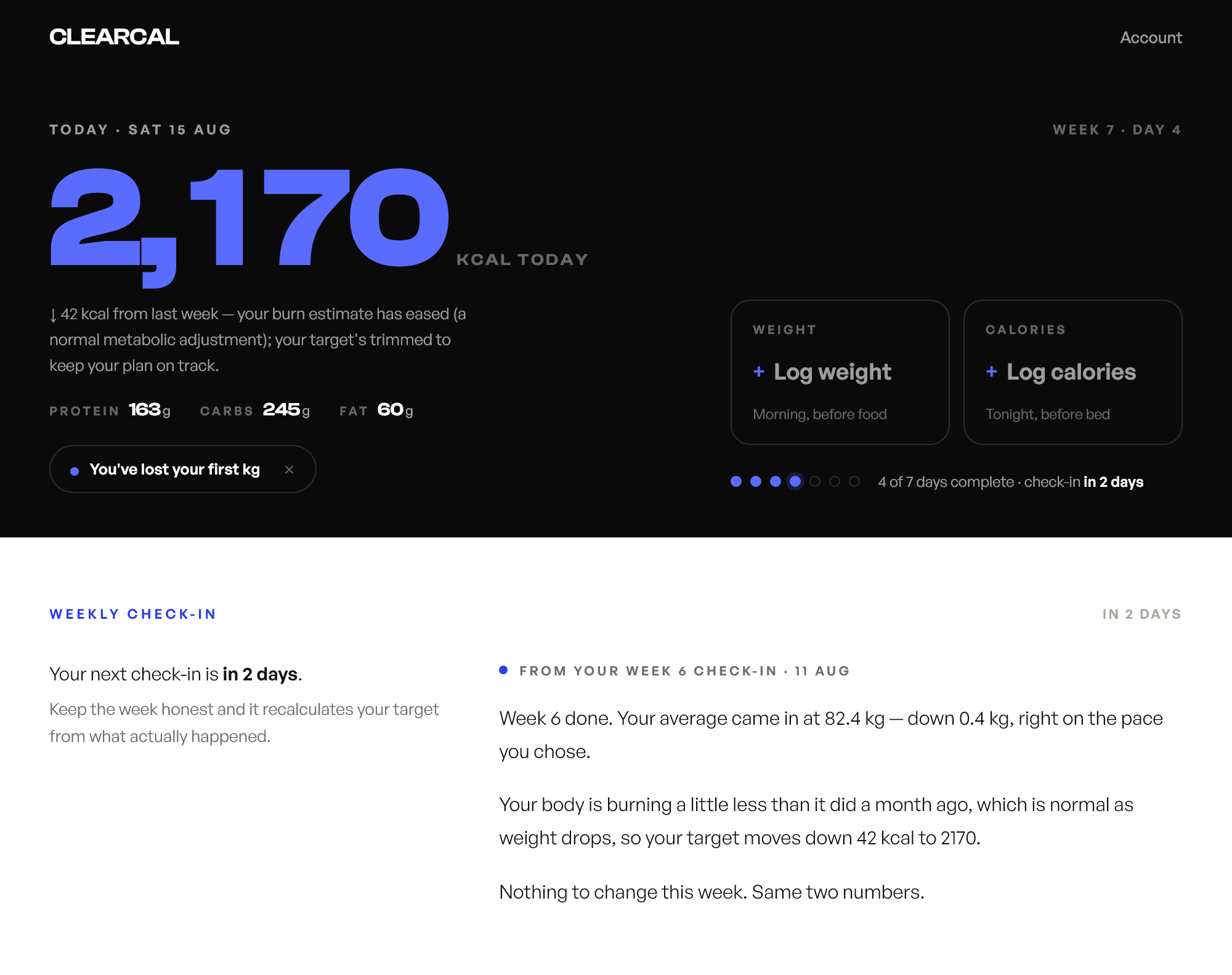
Understand your weekly review
Your check-in explains what your recent progress means and why your calorie target has stayed the same or changed.
Example shown: a 42 kcal adjustment after a weekly check-in.
See your progress
beyond a single weigh-in
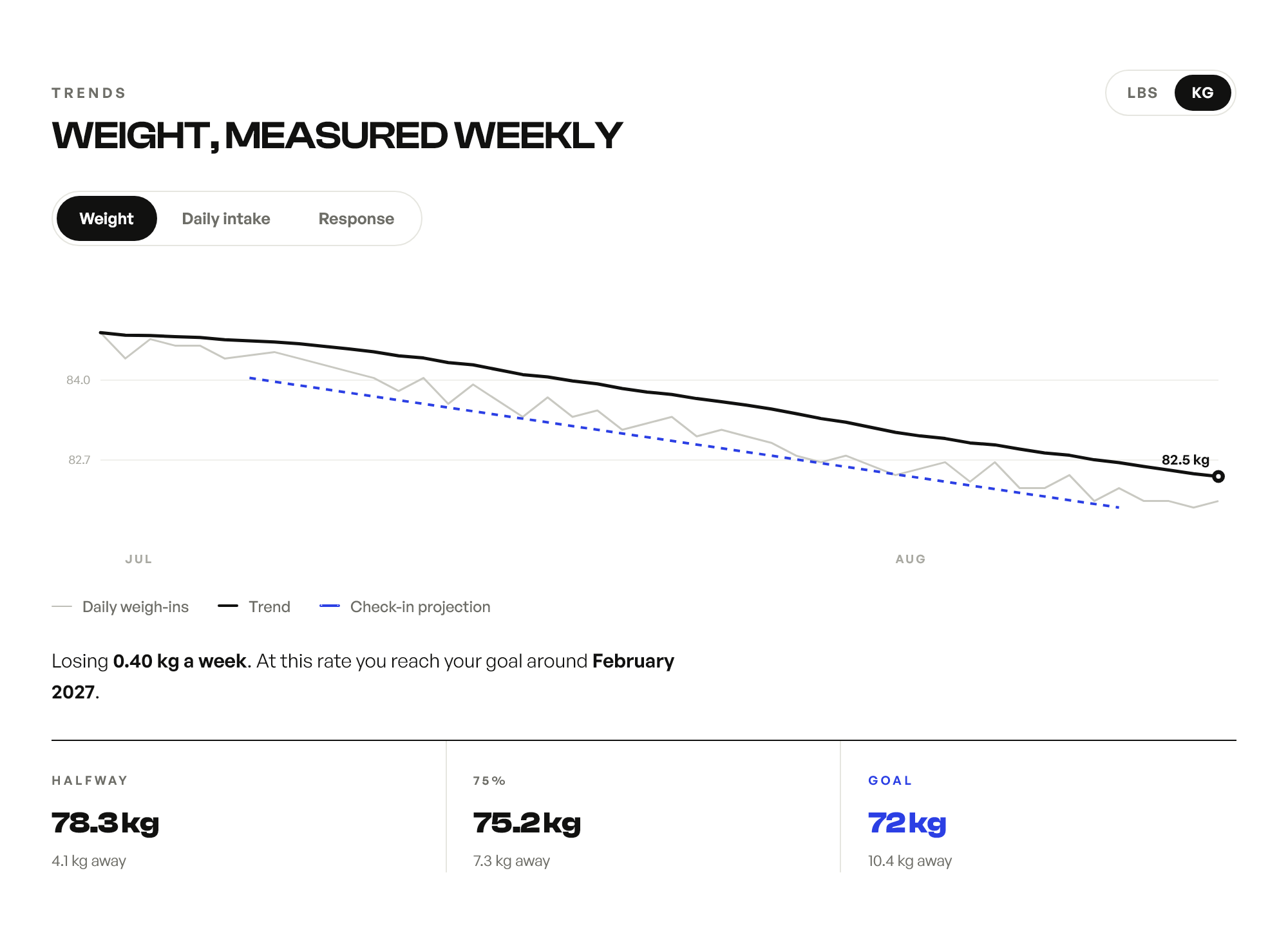
Your weight can fluctuate from day to day, so ClearCal shows your overall trend alongside your projected progress to help you understand the direction you’re heading.
Your progress in one place
Follow the direction of your weight, your recent pace and the milestones on the way to your goal.
Projections update as you log more data and are estimates rather than guaranteed outcomes.
Keep using your favourite food tracker
If you already use MyFitnessPal, another app or a notebook, simply enter your daily calorie total in ClearCal. You can keep tracking food the way you prefer without having to log every meal twice.
Your first step
costs nothing
Get your calorie target and free plan before deciding whether you want weekly coaching in the dashboard. Taking the quiz doesn’t start a subscription.
Your starting target Free
You’ll see your calorie target when you finish the quiz and can add your email to receive your free personalised plan and macro breakdown, with no card needed.
Weekly calorie coaching Optional
Continue with weekly target reviews, written explanations and progress tracking in the ClearCal dashboard, powered by TrueTDEE. The 14-day free trial requires a card, then costs £4.99/month, and you can cancel at any time.
A few things
you might be wondering
What makes ClearCal more than a calorie calculator?
A calculator gives you a starting estimate. With a ClearCal dashboard subscription, your calorie target adapts to your logged progress through weekly check-ins, with an explanation of why it has changed or stayed the same.
Will the quiz tell me if my metabolism is slow?
The quiz gives you a starting estimate rather than a verdict on your metabolism. To see whether your daily calorie burn is higher or lower than expected, TrueTDEE needs your weight and calorie logs over time. That comparison typically becomes available after about six weeks of usable data in the dashboard.
How does ClearCal work out what I burn?
ClearCal calculates your expected daily burn from your age, sex, height, weight and activity level, then combines that starting estimate with your calorie logs and weight trends at weekly check-ins. As you build up consistent, accurate logs, your own results play a larger role.
Do I have to track every meal in ClearCal?
You only need to enter your total calories and weight in ClearCal, so you can use your existing food tracker to work out your daily total without logging each meal again. You’ll need to enter that total yourself, as ClearCal doesn’t automatically sync your food log.
Is ClearCal a metabolism test?
ClearCal estimates total daily energy expenditure (TDEE): the calories you burn across the whole day. It learns from logged intake and weight changes; it isn’t a laboratory measurement or a way to diagnose a medical condition.
Can I just use the free result?
Yes, your starting calorie target is free, and your personalised plan and macros are free when you provide your email. Ongoing weekly coaching, target adjustments and progress tracking are part of the optional dashboard subscription.
Start with a calorie target
built for you
Choose your goal and take the free quiz to find your starting calories.